OpenSOC: Building an Open Source SOC Lab That Does Not Suck
Post Details
Description: A Series about creating your own SOC infra structure for free without compromising wallet or freedom.
Date: May 06, 2026
Word_Count: 302
About this project
SOC HomeLab is a series about OpenSOC: Building a Practical SOC Lab on a 16 GB RAM Laptop
For the last year I have been working with SIEMs and Meraki Firewall / MDM at work but my main issue is reproduing what I have learnt there to keep track of what I am doing or what I can work on and in cybersecurity mainly keeping tracking of KNOWLEDGE can be difficult since there are not much “code” that I write that often, my main work include pentest and SOC/NOC.
I wanted to build a practical SOC lab that focuses on real telemetry, detection engineering, endpoint visibility, and incident response workflows without depending on expensive cloud VMs or enterprise hardware.
The goal is not to rebrand existing tools or create another pretty dashboard. The goal is to understand how SOC components work together and build a lab that can be expanded over time.
Version 0.1 focuses only on Linux SOC engineering.

Included:
- Wazuh SIEM
- Linux endpoint monitoring
- auditd telemetry
- osquery/FleetDM endpoint posture
- Suricata IDS
- Shuffle SOAR

Deferred:
- Windows telemetry
- Active Directory / LDAP
- ETL pipeline
- AI summaries
- management dashboard
- Kubernetes
I intentionally avoided adding everything at once. The first goal is to get strong Linux visibility and useful SOC workflows before expanding into Windows, identity, ETL, and management reporting.
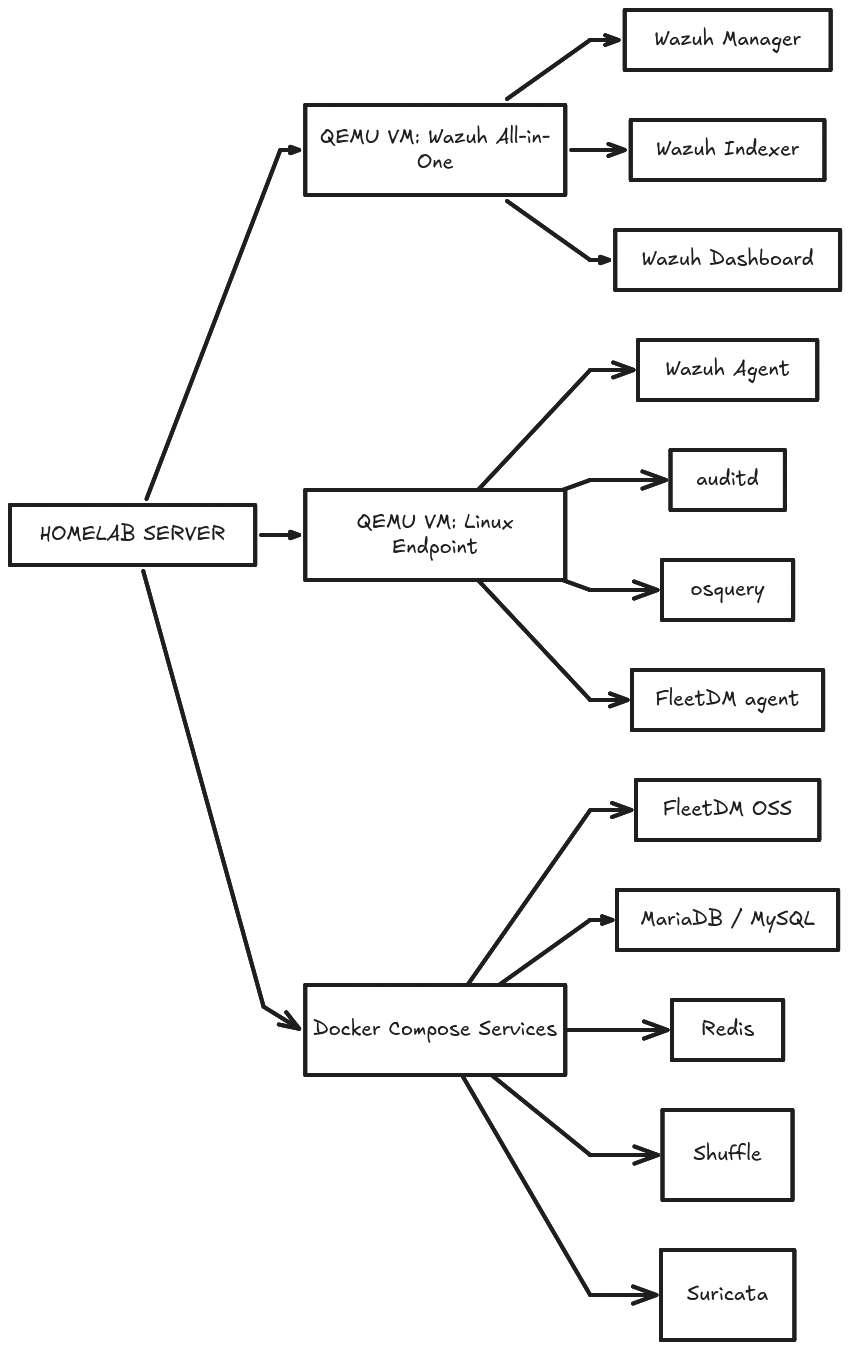
Wazuh Setup
the target agent count for wazuh for this lab is 2 devices once is a macbook and one is a linux machine
- OS: Debian 13
-
Hostname: debian
-
Domain Name:
-
root password: 123123123
-
user: wazuh-operator
-
password: Demo@1234
-
[SINCE I AM ON BIOS QEMU I WILL BE DOING THE FOLLOWING PARTITIONS]
/<- this would be consisting of both the boot and root partition with decent bit of swap.
-